Every Supabase project. One calm window.

Supapad is a native Mac app for people who run Supabase in production. It watches health, logs, alerts and advisors for every project in every org, and puts whatever needs you at the top.

Free for 7 days, then one project stays free. Supapad Pro unlocks everything for $19.99, paid once.

  • macOS 14.4 Sonoma or later
  • Read-only by design
  • No Supapad server

All 5 projects healthy

Every service on every project answered the last health check.

Projects
5 · 3 orgs
Last checked
just now

Projects

Add project

  1. storefront

    Linden

    Healthy
    • db
    • auth
    • rest
    • rt
    • store
    • fn
    100% uptime · 24h1 finding
  2. staging-api

    Linden

    Healthy
    • db
    • auth
    • rest
    • rt
    • store
    • fn
    100% uptime · 24h0 findings
  3. ledger

    Personal

    Healthy
    • db
    • auth
    • rest
    • rt
    • store
    • fn
    100% uptime · 24h0 findings
  4. atlas

    Harbor Studio

    Healthy
    • db
    • auth
    • rest
    • rt
    • store
    • fn
    100% uptime · 24h0 findings
  5. marketing-site

    Harbor Studio

    Healthy
    • db
    • auth
    • rest
    • rt
    • store
    • fn
    100% uptime · 24h0 findings

Built for running things, not building them.

Supabase Studio shows one project at a time. Supapad watches all of them and keeps its own history, so you can see what happened while you weren’t looking.

  1. Health
  2. Alerts
  3. Logs
  4. Database
  5. Advisors

Catch the flap the dashboard already forgot.

Per-service health timelines for every Supabase project: the database, auth, REST, realtime, storage and edge functions. The platform only serves the last 24 hours. Supapad keeps what it has seen, so Tuesday’s realtime blip is still there on Friday.
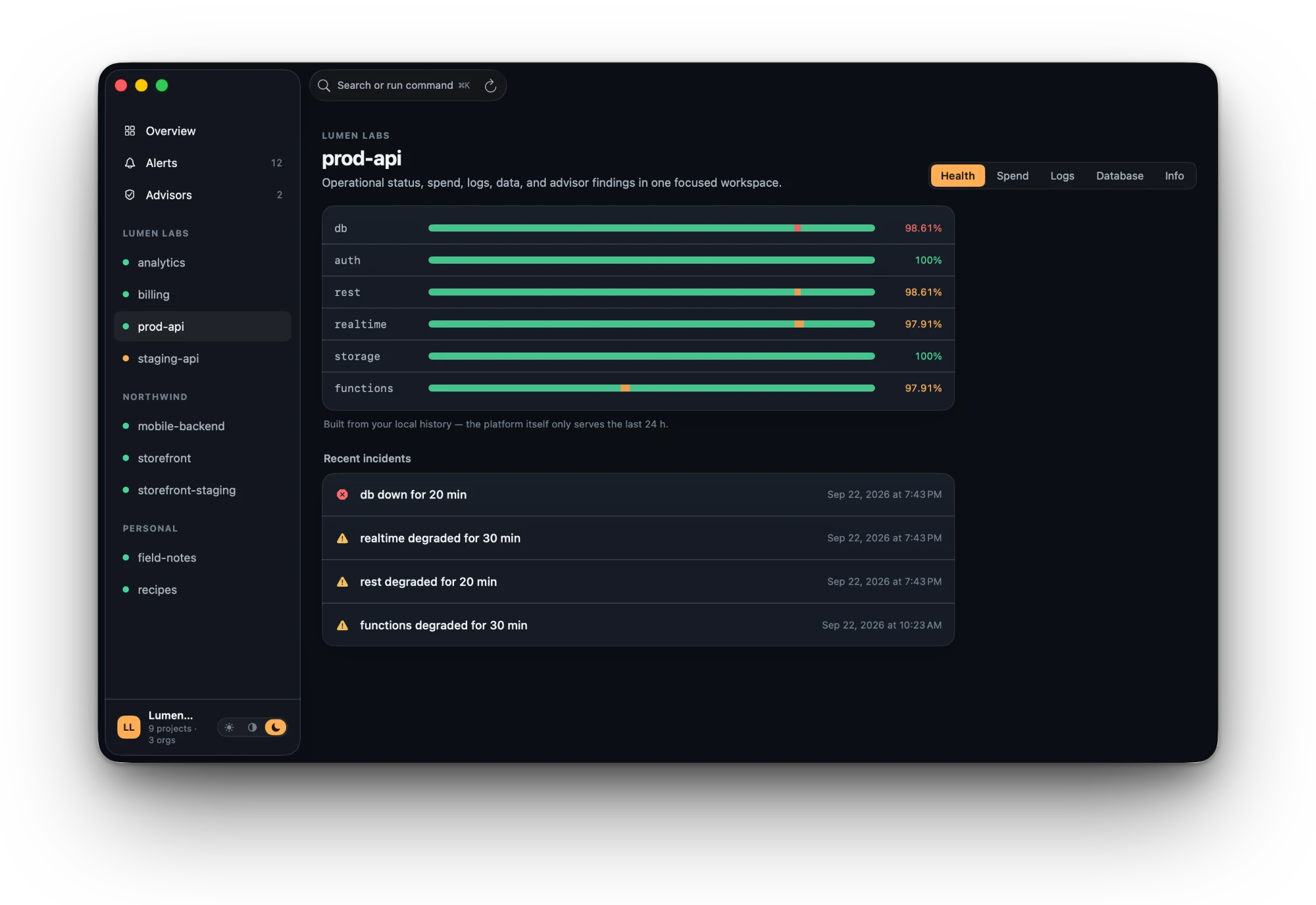
Supapad Health tab for prod-api: six per-service uptime strips for db, auth, rest, realtime, storage and functions with small red and amber segments where incidents happened, and a Recent incidents list below.

Know the moment something changes.

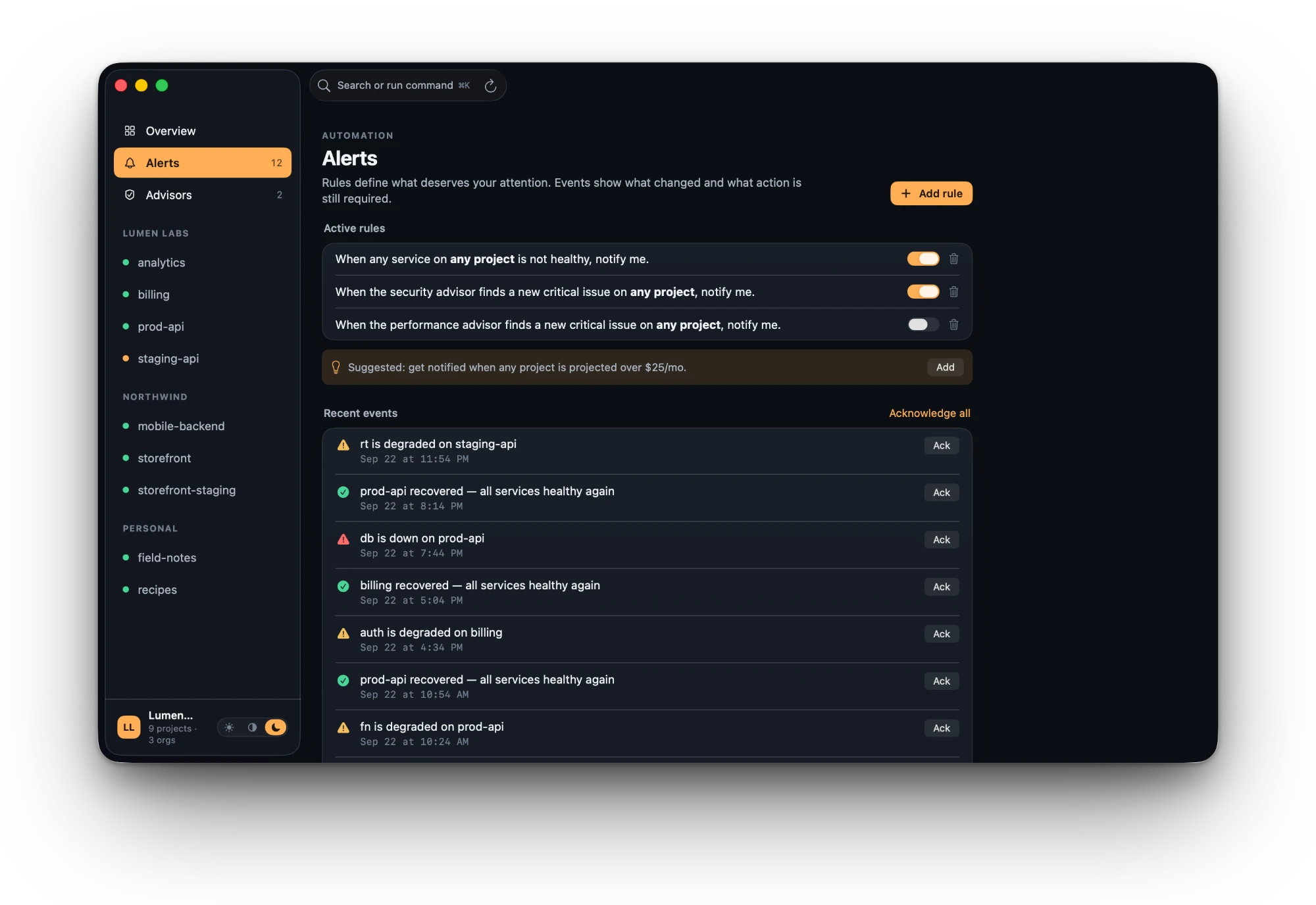
Local rules watch for health changes and new security findings, then send native notifications that open the right project. Rules are checked the moment new data arrives, so an alert is only ever one poll behind.

Supapad Alerts screen: three rules written as sentences with toggles, a suggested spend rule, and a feed of recent events such as “db is down on prod-api” and “prod-api recovered”, each with an Ack button.

Search your Supabase logs past the 24-hour window.

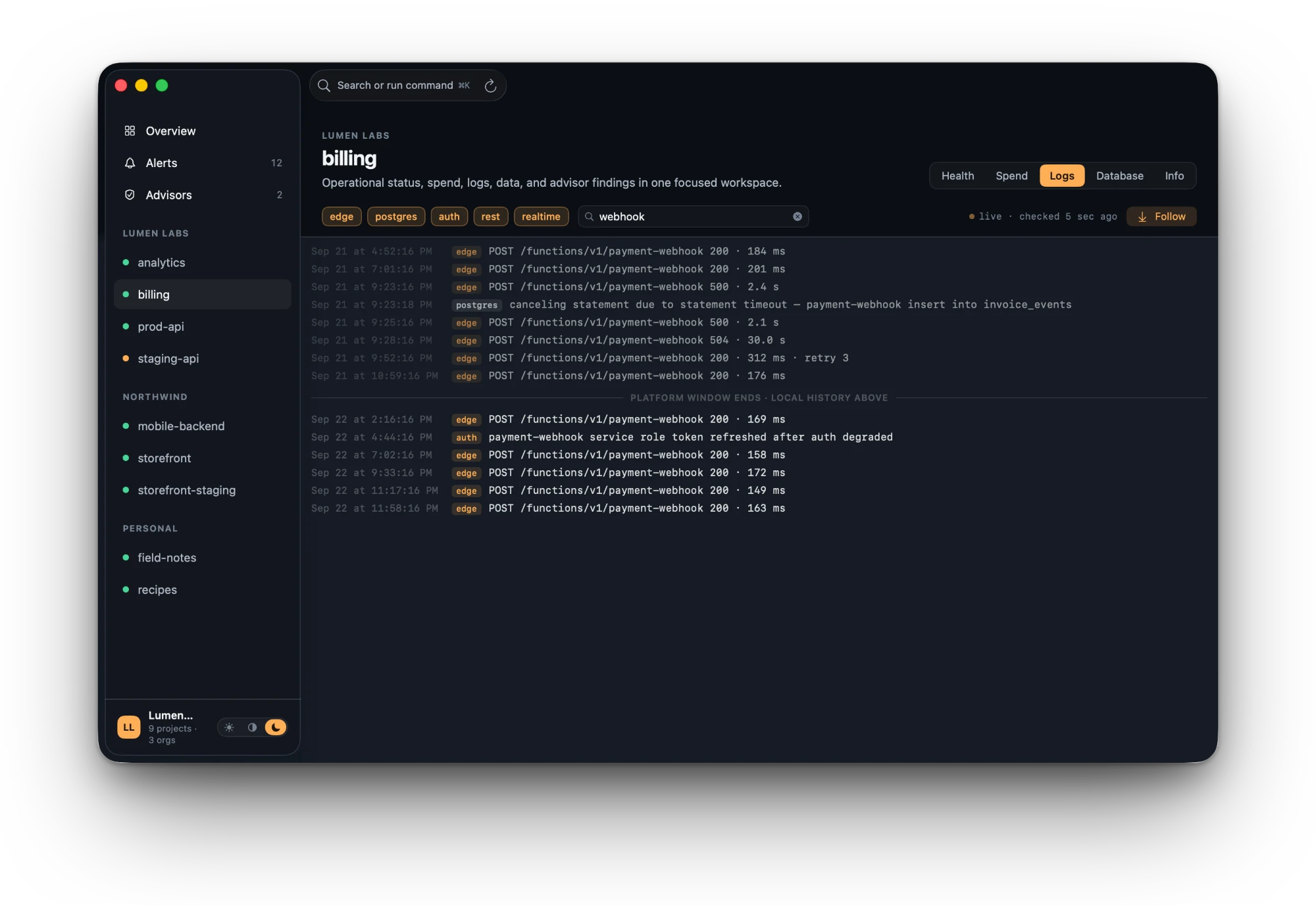
One tail across edge, Postgres, auth, realtime and REST, cached on your Mac with full-text search. A marker shows exactly where the platform’s window ends and your local history begins.

Supapad Logs tab filtered to “webhook”: edge, postgres and auth log lines with timestamps, a 504 and a statement timeout, and a divider reading “platform window ends · local history above”.

Query production Postgres without the risk.

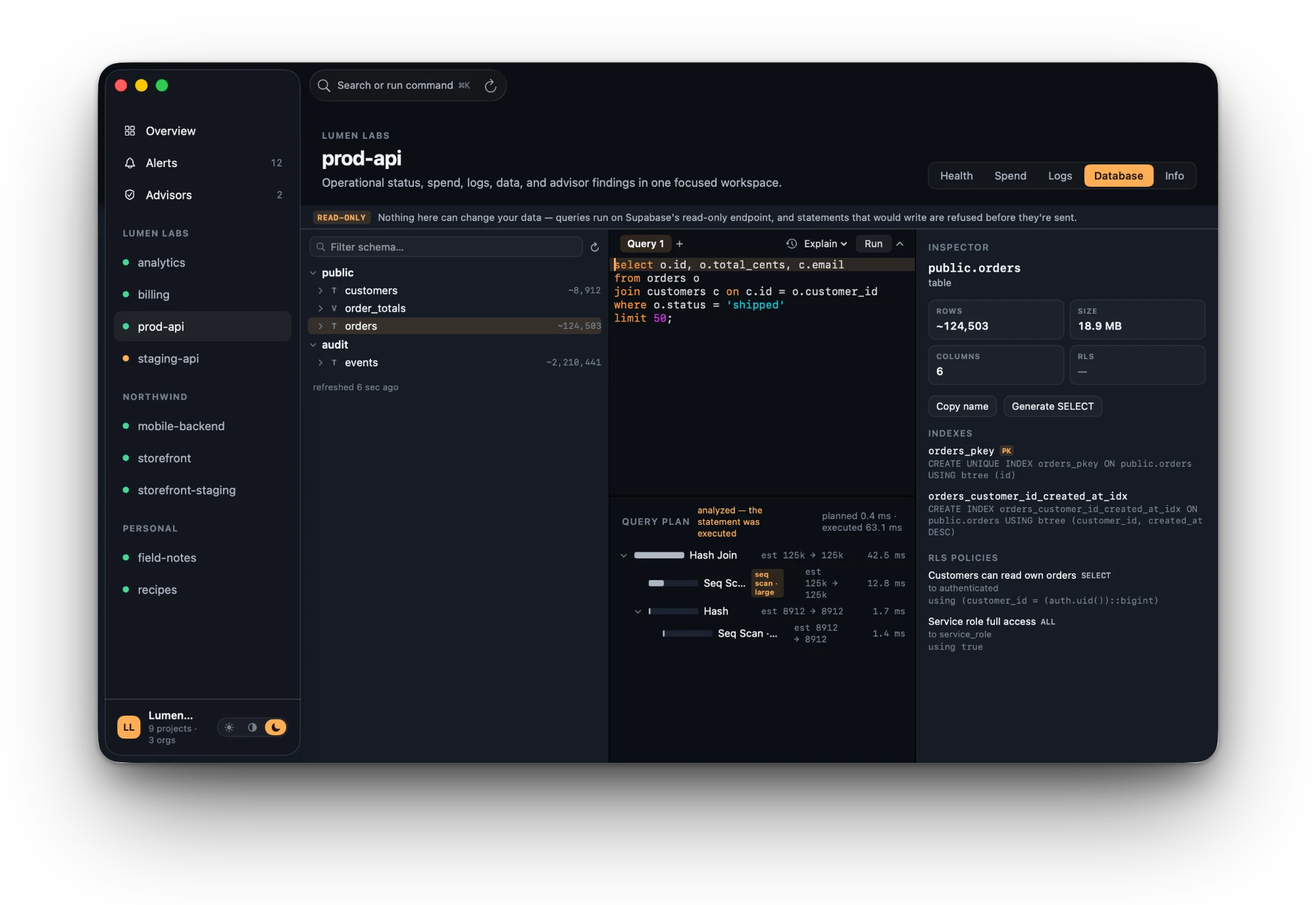
Browse schemas, tables and RLS policies. Write SQL with schema-aware completion, then read the EXPLAIN plan as a graph that points out disk-spilling sorts and row estimates that are off by 10× or more. It’s read-only three times over: Supabase’s read-only endpoint, a classifier in the app, and a connection that can’t ask for write access.

Supapad Database tab: a read-only banner, schema browser with row counts, a SQL query joining orders and customers, a query plan flagging a large sequential scan, and an inspector showing indexes and RLS policies for public.orders.

Security advisors across every project, with the fix.

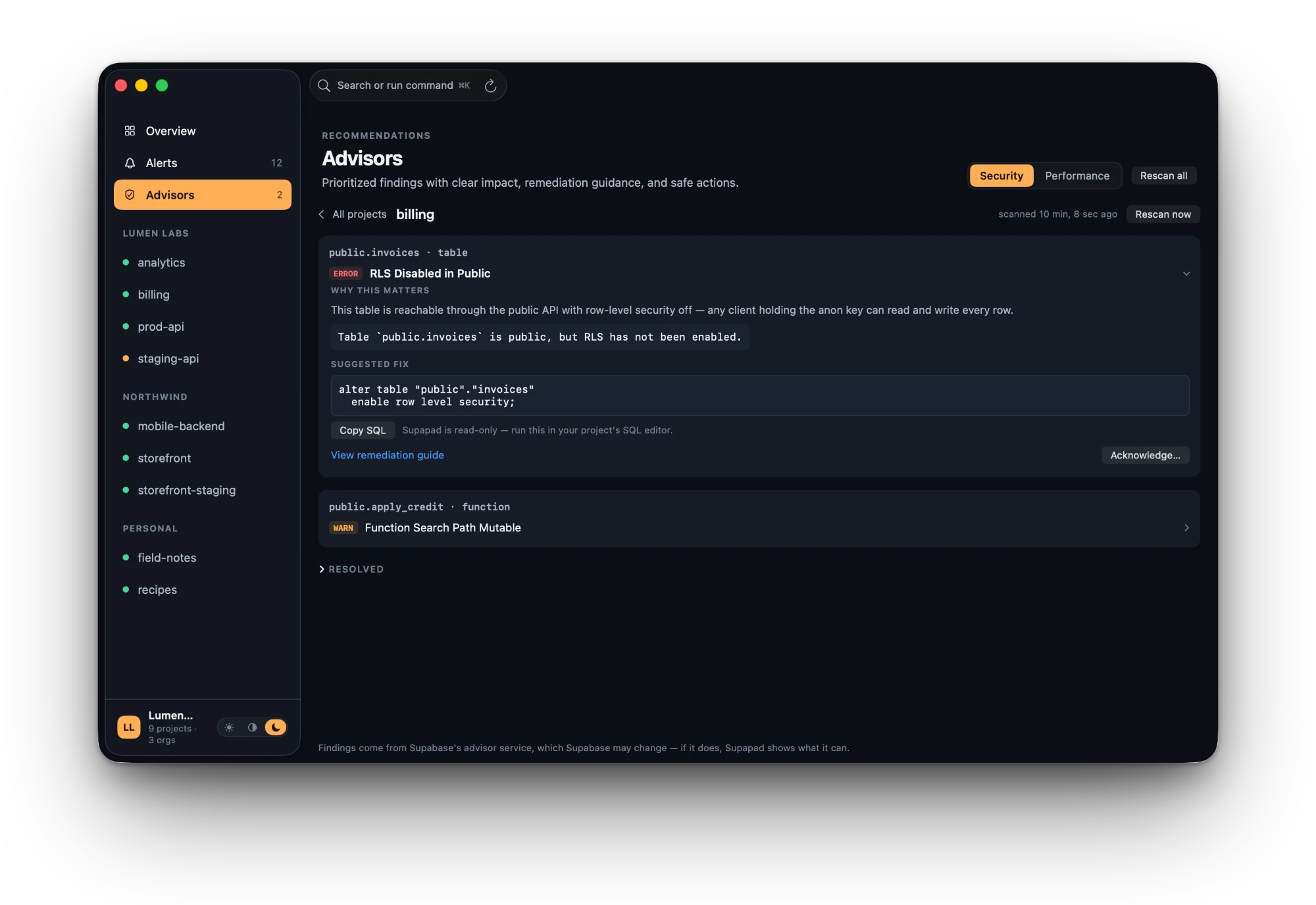
Supabase’s security and performance advisors for every project, checked every eight hours and tracked as new, resolved or back again. For lints it understands, Supapad explains why the finding matters and writes the fix SQL with the right names already filled in.

Supapad Advisors screen for the billing project: an error finding “RLS Disabled in Public” on public.invoices with why it matters, the suggested fix SQL, a Copy SQL button and a note that Supapad is read-only.

There is no Supapad server.

Your project data goes to one place, Supabase’s own API. Everything Supapad learns stays in a database on your Mac.

What Supapad touches
Where your data goesapi.supabase.com, and nowhere else
Analytics and telemetryNone in the app. This website uses Google Analytics. This website loads the ChatGPT Ads measurement pixel; see the privacy policy
Local historySQLite on your Mac. You choose how long to keep it: 7 to 365 days, 90 by default.
Sign-inOAuth with PKCE, in a secure macOS sign-in window. No pasted keys. Tokens live in the macOS Keychain.
PermissionsRead-only. Database access is a separate opt-in, asked for only when you open it.
Built withSwiftUI and native macOS frameworks. No Electron, no web views.
RequiresmacOS 14.4 Sonoma or later and a hosted Supabase account
Read the privacy policy

Questions, answered plainly.

What is Supapad?

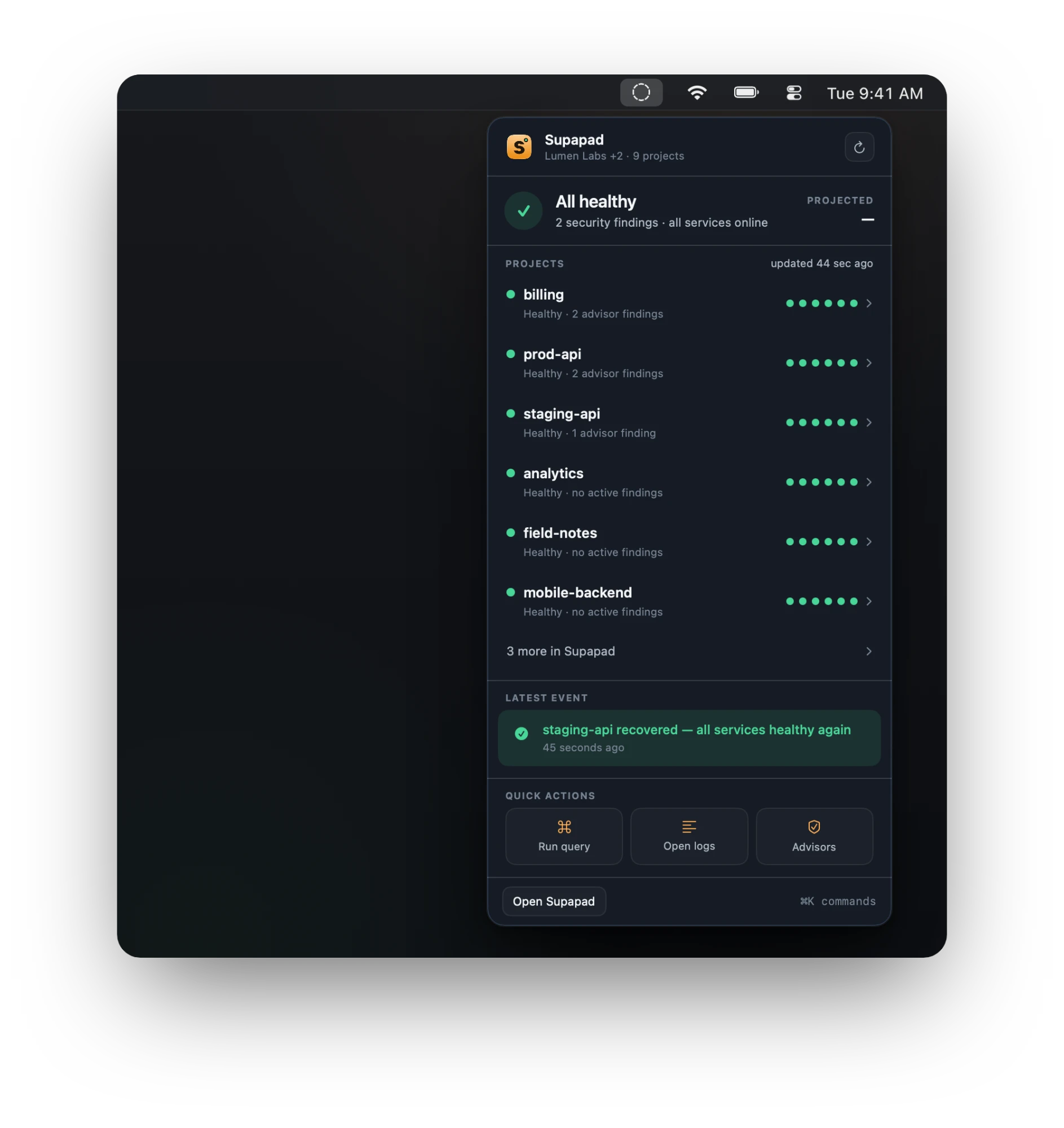
Supapad is a native macOS app for Supabase, built for people who run more than one project. It connects to your Supabase account and shows health, logs, alerts, security advisors and a read-only SQL editor for every project and org in one window, with a status icon in your menu bar.

Can Supapad change anything in my projects?

No. It asks for read-only scopes and can’t pause, scale or edit anything. The SQL editor refuses write statements before they leave your Mac. Writes may come later as a separate opt-in, with every change shown as SQL first.

Does it replace Supabase Studio?

No, and it isn’t trying to. Studio is where you build a project. Supapad sits beside it and watches all of them: health, cost, logs and advisors across every org, with a history Studio doesn’t keep.

How often does it check my projects?

Every 30 seconds to 5 minutes, depending on the project. Starred projects and ones that changed recently are checked more often, stable ones less. If Supabase rate-limits it, Supapad backs off and shows a “throttled” badge instead of passing off stale data as fresh.

Do alerts work when my Mac is asleep?

Not yet. Alerts are checked on your Mac, so it has to be awake and Supapad running. That’s the price of having no server. When the Mac wakes up, Supapad catches up and tells you what changed.

Does it work with self-hosted Supabase?

Not today. Supapad is built on the Supabase Management API, which only the hosted platform provides. Local development environments are on the roadmap.

Is Supapad made by Supabase?

No. It’s an independent app from Apps by SAHARA, built on Supabase’s public APIs. It isn’t affiliated with or endorsed by Supabase Inc.

How much does it cost?

The app is free to download, and everything is unlocked for the first 7 days. After that, one project of your choice keeps working for free: health, alerts, logs, all of it. Supapad Pro puts every project and org back on the board for $19.99, paid once through the Mac App Store. No subscription, no per-project fee. Get it on the Mac App Store.

The Supapad app icon: a dark S on amber with a green status lamp

Know your projects are fine.

Sign in with Supabase, and every project in every org shows up as soon as the first sync finishes. Free for 7 days; Supapad Pro is $19.99, paid once.

Download on the Mac App Store